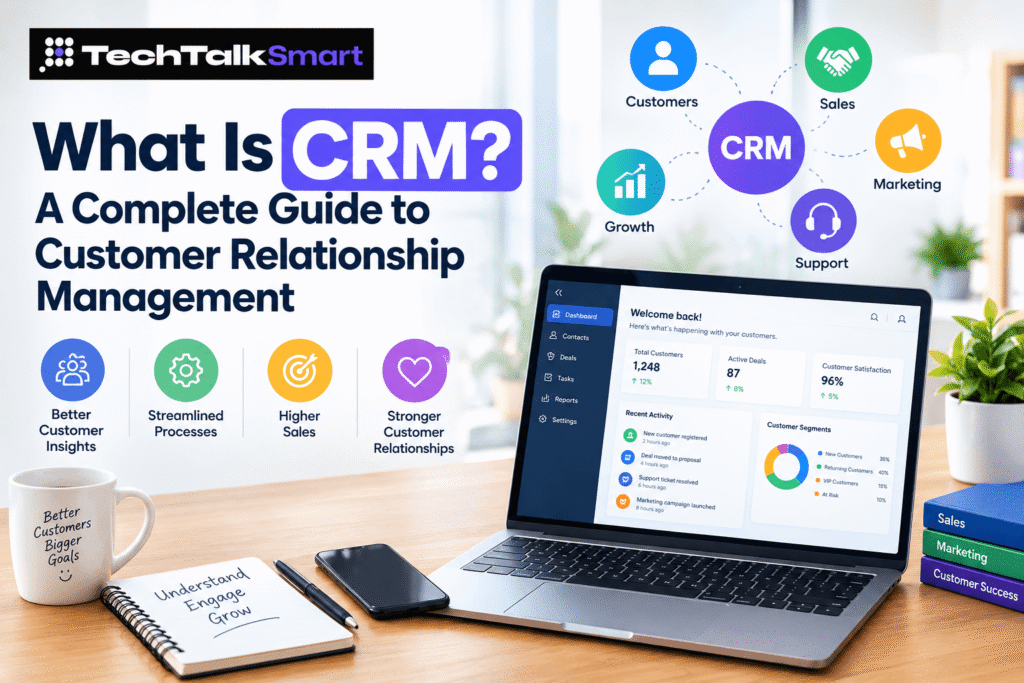
Somewhere around your second year in business, someone will tell you to “just put it in the CRM.” If you nod along without really knowing what that means, you’re in good company. Plenty of people use these tools for months before anybody explains what they’re for. So, what is a CRM, really? And do you actually need one, or is it one more subscription you’ll forget to cancel?
Short answer: probably yes, but not for the reasons vendors usually give. Roughly 40% of salespeople still keep customer details in spreadsheets and email, according to a roundup of CRM statistics from Nutshell, and the same page cites Nucleus Research putting the average return at about $8.71 for every dollar spent. Take that second number with a pinch of salt, since studies like this tend to flatter the tools, but even a fraction of it is hard to ignore. This guide covers what the thing does, the different kinds, what it costs, where it goes wrong, and how to pick one without losing a month of your life to sales demos.
What Is CRM (Customer Relationship Management)? and what does it stand for?
Let’s get the boring bit out of the way. The letters stand for customer relationship management. If you want one line to define CRM, it’s the practice of keeping track of every interaction you have with the people who buy from you, or might one day. Notice I said practice, not software. Businesses did this long before computers existed, with rolodexes, notebooks, and that shopkeeper who simply remembered your name and what you bought last time.
People who search for what does CRM mean are usually asking something slightly different underneath: what’s in it for me? Fair question. The point is that a customer shouldn’t have to repeat themselves. If Priya spoke to your sales rep on Tuesday and emails support on Thursday, support should already know about Tuesday. When that doesn’t happen, customers notice, and they’re not shy about telling people.
These days, though, when someone uses the word they almost always mean a tool. A customer relationship management CRM system is a shared database where contact details, emails, calls, deals, notes and tasks all hang off one customer record. Everyone on the team looks at the same picture instead of five slightly different ones living in five inboxes.
What Is CRM Software and How Does It Work?
At its core the software is simpler than the marketing makes it sound. Every person or company you deal with gets a record. Everything that happens with them gets attached to that record, in order. That’s about 80% of the value right there.
Data gets in a few ways. Web forms push new leads straight in. Email and calendar sync log conversations without anyone typing a thing. Calls can be logged automatically or by hand, and you can import old spreadsheets if you’re migrating (expect some mess, there’s always some mess). Once the records exist, you move deals through stages, a pipeline, from “new lead” to “won” or “lost”. Most tools show this as a board where you drag cards from column to column, which sounds childish but works shockingly well.
Then comes the automation. Reminders to follow up in three days. A welcome email when someone signs up. A task for the account manager when a big customer goes quiet. A decent CRM system saves your team from typing the same thing twice, and that’s honestly the test I’d use for any tool: does it remove work, or just move it somewhere else?
Reports sit on top of all this. How many leads came in, which ones turned into customers, how long the average deal takes. Nothing fancy, until you try to answer those questions from a pile of spreadsheets.
What Are the Main Types of CRM?
Most tools get sorted into three buckets. In reality plenty of products blur the lines, but the categories are still useful for figuring out what you’re shopping for.
Operational CRM
This is the everyday workhorse. It handles the front-line stuff: capturing leads, tracking deals, scheduling follow-ups, logging support tickets, running basic email campaigns. If you’re a small or mid-sized company and just want to stop losing track of people, this is probably the type you need. Most of the well-known names started here.
Analytical CRM
The analytical flavour is about digging through the data you’ve collected. Which customers buy again? Which channels bring the best leads? Who’s likely to leave next quarter? It’s heavy on dashboards, segmentation and forecasting. Honestly, it only pays off once you have a decent amount of data. A company with 50 customers doesn’t need predictive anything, it needs a phone and some good manners.
Collaborative CRM
Collaborative systems focus on sharing. Sales, marketing and support all see the same history and can pass customers between them without dropping the ball. Think shared inboxes, internal notes, and handoff rules. For companies where several departments touch the same customer, this is the piece that stops the “wait, who’s handling this account?” Slack messages.
What Are the Key Features of CRM Software?
Feature lists get ridiculous fast, with some vendors listing a hundred items. In practice, these are the ones that matter day to day:
- Contact and company records: The foundation. Names, emails, phone numbers, social profiles, and a full history.
- Pipeline and deal tracking: Visual stages, deal values, expected close dates.
- Task and reminder management: Nobody remembers follow-ups on their own, no matter what they claim.
- Email integration: Gmail and Outlook sync so conversations log themselves.
- Lead capture and scoring: Forms, chat widgets, and rules for ranking which leads deserve a call first.
- Automation: Workflows that handle repetitive steps.
- Reporting and dashboards: Simple charts you’ll actually look at.
- Mobile app: Underrated. Field reps and busy founders live on their phones.
- Integrations: Connections to billing, accounting, marketing and support tools.
If a tool nails the first five and is only so-so on the rest, that’s often still a better pick than one with every bell and whistle that nobody on your team wants to open.
What Are the Benefits of CRM for Businesses?
Vendors love to promise the moon here. The real benefits are more modest, and more believable.
Better Customer Relationship Management
When all the history is in one place, conversations get warmer. You know they mentioned a daughter’s wedding last month. You know they complained about delivery in March. Small stuff, but it’s what separates “a company” from “a company that remembers me.” Good CRM management mostly comes down to habits rather than features, mainly whether people actually log things. A tool nobody updates is just an expensive address book.
Improved Lead Management and Conversion Rates
Leads die quietly. Someone fills a form on Friday, the right person is on leave, and by Tuesday they’ve signed with a competitor. With routing rules and reminders, new leads land with the right person fast and nothing sits untouched. Teams often see conversion improve simply because follow-up becomes consistent, not because they’ve found some clever trick.
Increased Sales Productivity
Reps spend a surprising amount of time on admin: hunting for old emails, updating spreadsheets, writing the same message for the fortieth time. CRM in sales management changes that, because managers can see where deals are stuck without pestering anyone, and reps can use templates and automation for the dull parts. More time selling, less time fiddling. It won’t turn a weak team into a strong one, but it’ll stop good people from wasting hours.
Better Customer Retention and Loyalty
Keeping a customer is cheaper than finding a new one, which everyone knows and almost nobody acts on. When the system flags that a customer hasn’t ordered in 90 days, or that a support ticket has been open too long, someone can step in before it becomes a cancellation. Renewal dates, birthdays, check-ins, all the little things that show you’re paying attention.
Improved Team Collaboration
Without a shared record, information lives in people’s heads. Then Raj goes on holiday and nobody knows what he promised the client. Shared notes, tagging colleagues and clear ownership of accounts fix most of this. It’s not glamorous, but it removes a lot of friction between departments.
Data-Driven Business Decisions
Gut feeling is fine until it isn’t. CRM in management gives owners and team leads actual numbers: what the pipeline looks like, which campaigns bring paying customers rather than just clicks, how long it takes to close a deal. You can still go with your gut, but at least you’ll know when it disagrees with the data.
Who Should Use CRM Software?
Short answer: more businesses than you’d think. The obvious ones are sales-driven companies, agencies, consultants, real estate teams, software firms and anyone with a repeat customer base. But I’ve also seen it work well for gyms, schools, clinics, nonprofits managing donors, even a wedding photographer who finally stopped losing enquiries in her DMs.
A rough rule: if you have more customers or leads than you can comfortably hold in your head, you’re due. For a solo freelancer with ten clients, a spreadsheet is fine. Once you’ve got a team, or you’re losing track of who said what, the spreadsheet starts to creak. Honestly, most people wait about a year too long to switch.
What Is the Difference Between CRM and ERP?
These two get mixed up a lot because both are business software with lots of data. The difference is focus.
A CRM looks outward, at customers and prospects. Who are they, what have they bought, what do they need next. ERP (enterprise resource planning) looks inward, at the machinery of the company: inventory, accounting, payroll, procurement, manufacturing schedules.
Think of it this way. When a customer places an order, the sales side lives in the customer system and the stock and invoicing side lives in the ERP. Big companies often run both and connect them so an order flows through without anyone re-keying details. Small companies usually start with the customer side and add ERP much later, if ever.
CRM Examples: How Businesses Use CRM in Real Life
Knowing the definition is one thing, but seeing how people actually use this stuff day to day is where it clicks. Here’s what a normal Wednesday looks like for four different kinds of teams.
CRM for Sales Teams
A rep opens her dashboard and sees today’s calls, deals that haven’t moved in a week, and a lead that just visited the pricing page three times. She logs a call in thirty seconds, books a follow-up, and moves on. Her manager can see all of it without a status meeting. For larger sales organisations with complicated processes, Salesforce CRM is the name that usually comes up, mostly because you can customise it to nearly any workflow, though you’ll pay for that flexibility in setup time.
CRM for Marketing Teams
Marketers use the same data to segment audiences, run email campaigns, and see which sources actually produce customers. Instead of guessing, they can say “webinar leads close at twice the rate of ad leads” and move budget accordingly. It also keeps marketing and sales honest with each other, since both are looking at the same numbers.
CRM for Customer Service
Support agents see the full history the moment a customer writes in, previous tickets, purchases, who they spoke to last. No more “can you explain the problem again?” Tickets can be assigned, prioritised and tracked, and patterns show up quickly, like the same bug generating thirty complaints in a week.
CRM for E-commerce Businesses
Online stores use it to track purchase history, recover abandoned carts, send replenishment reminders, and spot their best customers. A candle shop, say, notices that people who buy once in November often buy again in December and sends them a nudge. It’s not clever, but it works, and it’s far cheaper than chasing new buyers through ads.
How to Choose the Right CRM Software for Your Business
Every list of top CRM software looks convincing until you try to use one of the tools on it. I’ve watched people spend six weeks comparing options and then pick the one their friend uses. Don’t do that, but also don’t overthink it. A sensible process looks like this:
- Write down your actual problems first. Losing leads? Messy follow-ups? No visibility into the pipeline? Choose based on that, not on a feature checklist.
- Be honest about your team. If people hate learning new tools, simple beats powerful every time.
- Check the integrations. It should talk to your email, calendar, accounting and website forms. If you’d need a developer to connect them, think twice.
- Try before you buy. Free trials exist for a reason. Put real data in, ask two or three team members to use it for a week.
- Think two years out, not ten. You don’t need a system for a company five times your size. You need one that won’t be painful to leave if you outgrow it, so check how easily you can export your data.
- Ask about support. When something breaks at 4pm on a Friday, can you reach a human?
Small teams and startups often do well with something light and friendly. HubSpot CRM is a common starting point for that reason, since the free tier covers the basics and it’s pleasant to use. Whatever you land on, run it for a few months before you judge it.
How Much Does CRM Software Cost?
It varies wildly, which is annoying but true. Prices shift often, so treat the numbers below as ballparks and check each vendor’s current page.
- Free plans: Several vendors offer a free tier with contact management, basic pipelines and limited reporting. Fine for solo operators and tiny teams.
- Entry-level paid plans: Roughly $15 to $30 per user per month for most mainstream tools. Adds automation, better reporting and more storage.
- Mid-range plans: Around $50 to $100 per user per month. Advanced workflows, custom fields, forecasting, deeper integrations.
- Enterprise plans: $150 per user per month and up, often with custom quotes, plus implementation costs.
The sticker price is rarely the whole story. Watch for charges on extra contacts, add-on modules, onboarding fees, and the cost of a consultant if the setup is complicated. Also factor in your own time. A cheap tool that takes forty hours to configure isn’t actually cheap.
Common CRM Challenges and How to Avoid Them
Most failures have nothing to do with the software. They’re people problems.
Nobody uses it. The number one killer. If the team sees it as extra paperwork or a way for managers to spy, they’ll avoid it. Involve them in the choice, keep required fields to a minimum, and show them how it saves them time.
Dirty data. Duplicates, outdated emails, half-filled records. It builds up quietly and then reports stop making sense. Set simple rules for entering information, and schedule a clean-up every few months.
Too much customisation too early. It’s tempting to build elaborate workflows on day one. Resist. Start with the basics, learn what you actually need, and add complexity later.
No clear owner. Somebody has to be responsible for the tool, even if it’s a part-time job. Without that, it drifts.
Unrealistic expectations. It won’t fix a bad product, a weak sales pitch or a messy process. It’ll just make those problems more visible, which is useful, but not always comfortable.
Weak data security habits. Customer information is sensitive. Use proper permissions, turn on two-factor login, and be careful about who can export lists.
What Is the Future of CRM?
Predictions in tech age badly, so I’ll stay modest. A few trends do look real, though.
AI is already doing the grunt work: drafting follow-up emails, summarising call notes, suggesting which lead to contact next. Some of it is genuinely handy. Some of it is a gimmick with a new coat of paint, so test before you trust it. Expect more automatic data entry too, which would fix the biggest weakness of these tools, people not logging things.
Conversations are moving into messaging apps, so tools are being built around WhatsApp, Instagram and live chat rather than just email and phone. Privacy rules keep tightening as well, which means better consent tracking and more careful handling of personal data is becoming a basic requirement rather than a bonus.
And I suspect the tools will get quieter. Less dashboard-staring, more “here’s the one thing to do next.” If that happens, I won’t miss the dashboards.
Conclusion
Strip away the jargon and the idea is old and simple: remember your customers, treat them well, and don’t make them repeat themselves. The software just makes that possible when you have more people than your memory can handle.
You don’t need the fanciest platform. Pick something your team will really use, start small, keep the data tidy, and give it a few months. If it saves your people time and stops leads slipping through, it’s earning its keep.
If you want more plain-spoken guides on business tools and software, keep an eye on Tech Talk Smart, where we break these topics down without the buzzwords.
FAQs
Do small businesses really need one?
Not on day one, necessarily. But once you’re juggling more than a few dozen contacts, or you’ve got more than one person talking to customers, a proper system starts paying for itself. Many offer free plans, so the risk is low.
Is a spreadsheet good enough?
For a while, yes. It gets painful when several people edit it, when you need reminders, or when you want to see history. Spreadsheets also don’t log emails or flag stalled deals.
How long does setup take?
A simple tool can be running in an afternoon. A customised setup for a larger team can take weeks or months, especially with data migration. Plan for more time than the vendor suggests.
Is customer data safe in these tools?
Reputable vendors invest heavily in security, but your habits matter too. Use strong passwords, two-factor login, limited permissions and regular reviews of who has access.
Can it connect to my email and WhatsApp?
Most tools sync with Gmail and Outlook. WhatsApp and other messaging channels are increasingly supported through built-in features or integrations, though it depends on the vendor and plan.
What’s a reasonable first step?
List your three biggest customer-tracking headaches, then sign up for two free trials and test them with real data. You’ll learn more in a week than from a month of reading reviews.
 Add us as a preferred source on Google